
SHANGHAI, April 3, 2026 /PRNewswire/ -- As AI becomes essential in K–12 education, many teachers face a practical question: How to teach AI through hands-on, project-based learning without advanced coding skills?
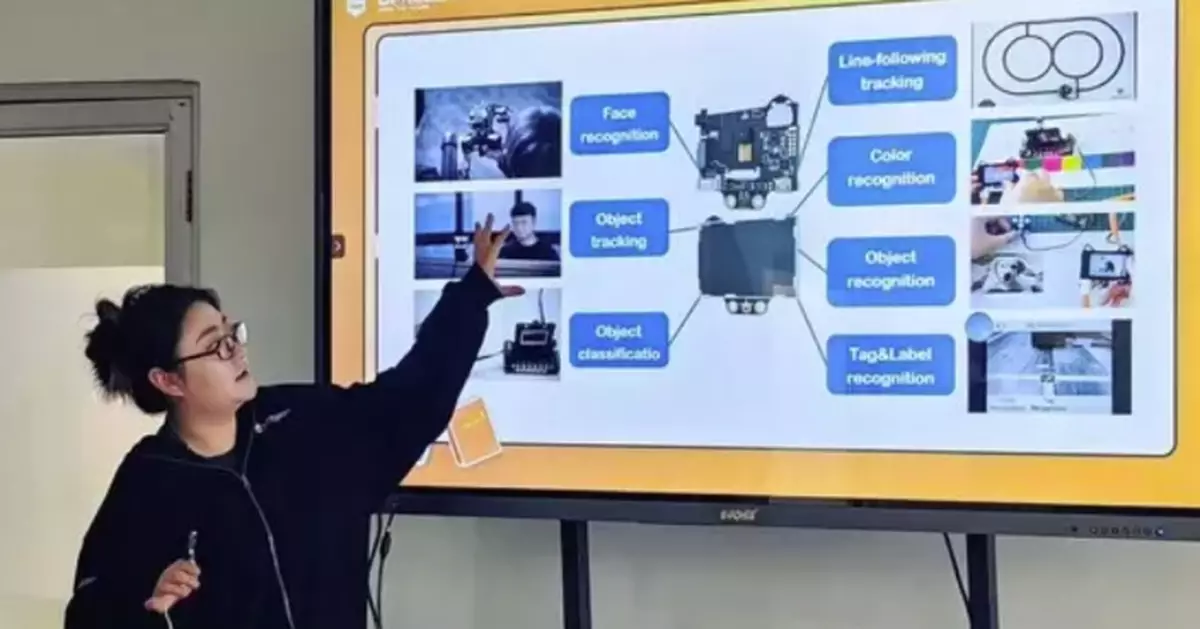
A recent workshop in Kathmandu University offers a clear answer. Conducted by DFRobot, an innovator in STEAM education, the three-hour workshop at the School of Engineering brought together teachers and department heads from across disciplines. Participants completed two hands-on AI projects while exploring how to translate these experiences into their own classroom teaching.
From Awareness to Classroom Practice
According to the Computer Science Teachers Association, while most educators support AI in the curriculum, many lack confidence in teaching it effectively. This workshop directly addressed that gap—moving from awareness to practical implementation.
Learning AI Through Hands-On Building
The training adopted a face-to-face, project-based approach, combining technical learning with pedagogy. It focused on deploying AI capabilities—such as speech and vision—on edge devices, connecting abstract concepts to interactive classroom applications.
Using UNIHIKER K10 hardware and Mind+ graphical programming software, participants completed two progressive projects:
Voice Interaction
Using the UNIHIKER K10 and the Mind+ graphical programming platform software, the workshop introduced voice-based human–machine interaction as an accessible entry point into AI learning. Teachers began by creating a simple voice-controlled system with commands such as "turn on the light," experiencing a fundamental AI interaction loop: wake → recognize → execute.
Building on this foundation, they extended the system to control on-screen movement through voice directions, transforming a basic function into a more engaging and interactive experience. Rather than focusing on complex programming, the training emphasized how simple voice commands can be translated into practical classroom applications.
Through this process, teachers gained a clear understanding of real-time voice interaction and its classroom potential.
Vision Interaction
The workshop introduced the HUSKYLENS AI vision sensor and its face recognition capabilities, helping teachers understand how machines perceive the world through visual data. Trainers explained the core workflow of face recognition—including detection, alignment, encoding, and matching—providing a clear technical framework for classroom application. Building on this foundation, teachers connected HUSKYLENS with the Mind+ programming environment and implemented real-time recognition tasks. Extending this approach, they developed a "Smart Pet" system by integrating HUSKYLENS with the UNIHIKER K10. The system could recognize different types of cats—such as Orange Tabby, Striped Tabby, and Siamese—and respond with corresponding interactive states.
Through this hands-on process, teachers gained a clear understanding of computer vision concepts and how visual input can drive interactive systems, enabling more engaging and project-based learning in the classroom.
A Model That Can Be Applied in AI Classrooms
The workshop highlights a practical approach to AI education that can be replicated across schools:
Accessible: Entry-level coding is all that's needed — suitable for K–12 learners.
Adaptable: Projects can be transformed into games, smart systems, or classroom tools
Structured: Aligned with project-based learning and real-world problem-solving
As part of the assessment, each teacher was asked to outline how the projects could be adapted for their own classrooms—highlighting a core objective of the training: not just using tools, but enabling curriculum design and effective knowledge transfer.
More importantly, it emphasized a critical shift—from understanding AI to applying it. By experiencing the full creation process, teachers gained the confidence to bring AI into their own classrooms.
** This press release is distributed by PR Newswire through automated distribution system, for which the client assumes full responsibility. **
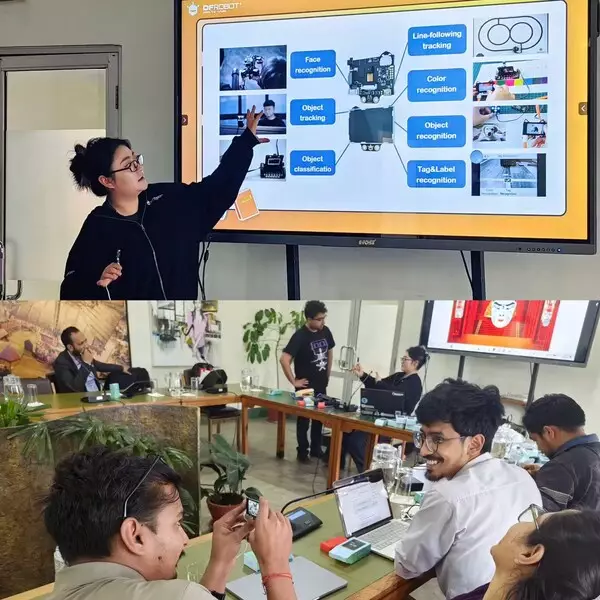
How to Teach AI in the Classroom: A Hands-On Teacher Training Workshop at Kathmandu University